
July 17th, 2026
A restaurant no longer sells food through one point of contact. Orders arrive at the counter, at a self-serve kiosk, from a table QR code, through a website and app, from Google, and across three delivery marketplaces often at once. The question is whether all of that runs on one system or six separate ones.
This is true whether you run a single café, a fast-casual chain, a full-service dining room with a busy takeout window, or a multi-location group. For years, operators treated the point of sale as the register and everything else (kiosks, online ordering, delivery) as something you added later from whichever vendor had the best demo. That worked when digital was a rounding error. It isn’t anymore. Digital ordering has become a major share of restaurant sales across formats, and in counter-service concepts it already tops half.
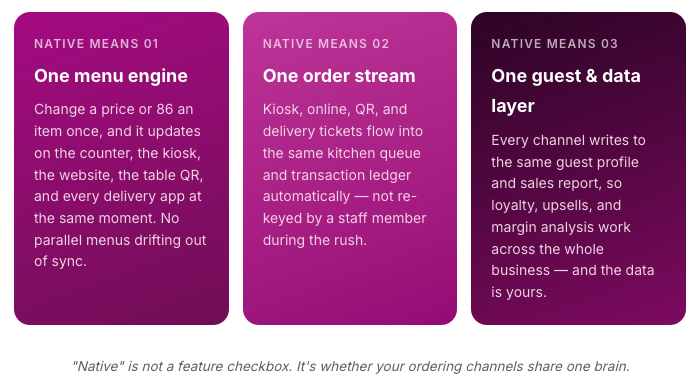
That shift changes what “evaluating a POS” even means. The right question is no longer “does it ring up sales fast?” It’s “are the kiosk and the online ordering channel native functions of this system, or three separate products taped together?” The difference doesn’t show up in the demo. It shows up on your busiest night, in your commission line, and in who holds your customer data. This guide is about spotting it before you sign.
Rule of thumb: a restaurant POS + Kiosk + Online Order stack from multiple providers can match a native POS one feature-for-feature on paper and still lose, because the cost of a fragmented system is paid in re-keyed orders, menu drift, and data you don’t own.
The case for treating kiosk and online ordering as core POS functions starts with a single trend: where orders actually come from. A decade ago, nearly every order was placed at a counter or with a server. Today those are two channels are growing fastest especially in quick-service, but the same curve is climbing behind it in fast-casual and full-service takeout.
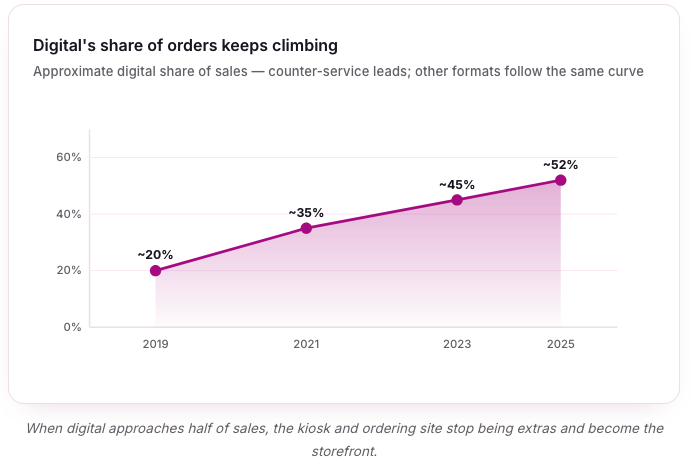
This is why a POS decision made on counter or table-service speed alone ages badly. The system you choose has to run the channels that are growing, not just the one you know today. And the operators feeling this most acutely are the ones juggling a POS from one vendor, kiosks from another, and an ordering site from a third, only to discover that “integrated” on a sales page often means “we’ll email you a nightly CSV.”
Self-serve kiosks earn their footprint two ways at once: they raise the average order value and they take pressure off the counter during the rush. A kiosk never forgets to offer the combo, never gets shy about the large, and never rushes a hesitant customer. That benefit isn’t unique to fast food: cafés, bakeries, fast-casual concepts, food halls, and full-service restaurants with express or takeout counters all see the same pattern wherever guests order at a point rather than a table.
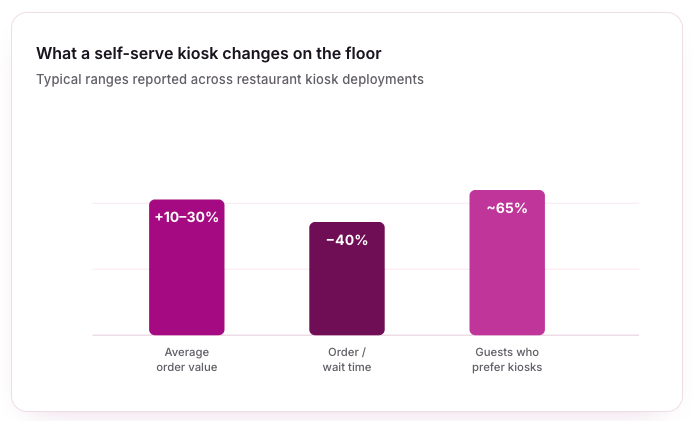
The second effect matters just as much in a labour-tight market. Every order a kiosk absorbs is one your team doesn’t have to take, freeing staff for food prep, expediting, or hospitality on the floor instead of standing at a till.
The integration test for kiosks: a kiosk only delivers these gains if its orders land in the kitchen and the sales ledger automatically. On a native system they do. Bolt a kiosk onto a POS it wasn’t built for and someone ends up re-entering orders by hand which erases the labour saving and reintroduces the errors the kiosk was supposed to remove.
Online ordering is where the money quietly leaks and it applies to every restaurant that does pickup or delivery, from a neighborhood pizzeria to a white-tablecloth room running a takeout menu. Third-party marketplaces bring reach, but they charge 15–30% commission on delivery orders and keep the customer relationship. Every order that flows only through a marketplace is a guest you can’t remarket to and a margin you don’t keep.
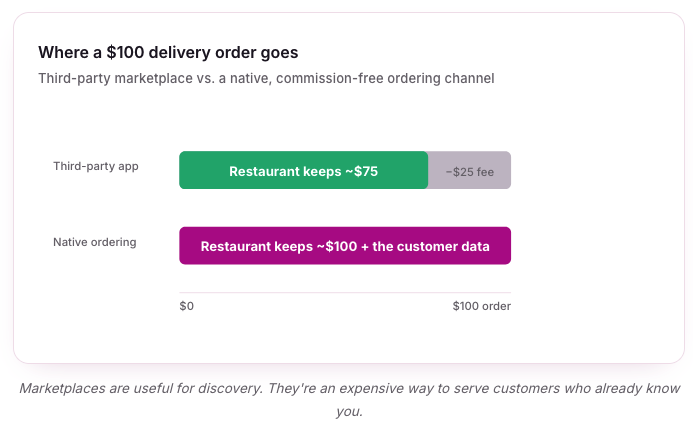
The winning pattern isn’t “abandon the marketplaces”, it’s using them for discovery while steering repeat orders to a channel you own. A native online ordering site with commission-free pickup and delivery, order-with-Google, and menus that sync from the same POS lets you do exactly that.
|
Feature
|
Native (One Provider)
|
Fragmented (Multiple Providers)
|
|---|---|---|
|
Menu Changes
|
Edit once, syncs to every channel instantly.
|
Update each system separately; menus drift out of sync.
|
|
Order Flow
|
Kiosk, QR & online tickets auto-route to KDS and ledger.
|
Orders re-keyed by hand or arrive on a separate screen.
|
|
Reporting
|
One dashboard across all channels and locations.
|
Stitch together exports from each vendor.
|
|
Customer Data
|
Unified guest profile; you own it.
|
Fragmented or held by the third party.
|
|
Support
|
One number when something breaks mid-service.
|
Vendors point at each other.
|
None of the right-hand column shows up in a feature comparison, every row still gets a checkmark. It shows up in labor hours, error rates, and the margin quietly handed to other companies. That’s why the evaluation has to probe integration, not inventory features.
When you sit through the demo, the feature grid will look similar across vendors. These are the questions that separate a genuine platform from a bundle of products with shared branding, useful whether you’re a café adding your first kiosk or a group standardizing across locations.
Most major restaurant platforms now offer kiosk and online ordering in some form. What varies is how tightly those channels are woven into the core POS and whether direct online orders are truly commission-free. The table below frames the landscape; Snappy is highlighted because kiosk and online ordering are native functions of the same platform, not separate purchases.
|
Provider
|
Kiosk
|
Online Ordering
|
Model
|
|---|---|---|---|
|
Snappy
|
Native self-serve kiosk, auto-injects to POS & KDS
|
Native, 0% commission + Order-with-Google
|
One all-in-one platform; you own the data
|
|
Toast
|
Add-on kiosk module
|
Native, often a paid add-on
|
Restaurant-first suite; processing locked in
|
|
Square
|
iPad-based kiosk
|
Native, commission-free direct
|
Easy entry; ecosystem add-ons
|
|
Clover
|
Self-ordering kiosk
|
Via app marketplace
|
Hardware-led; integrations vary
|
|
Grubbrr
|
Kiosk specialist
|
Integrates with third-party POS
|
Best-of-breed kiosk, separate POS
|
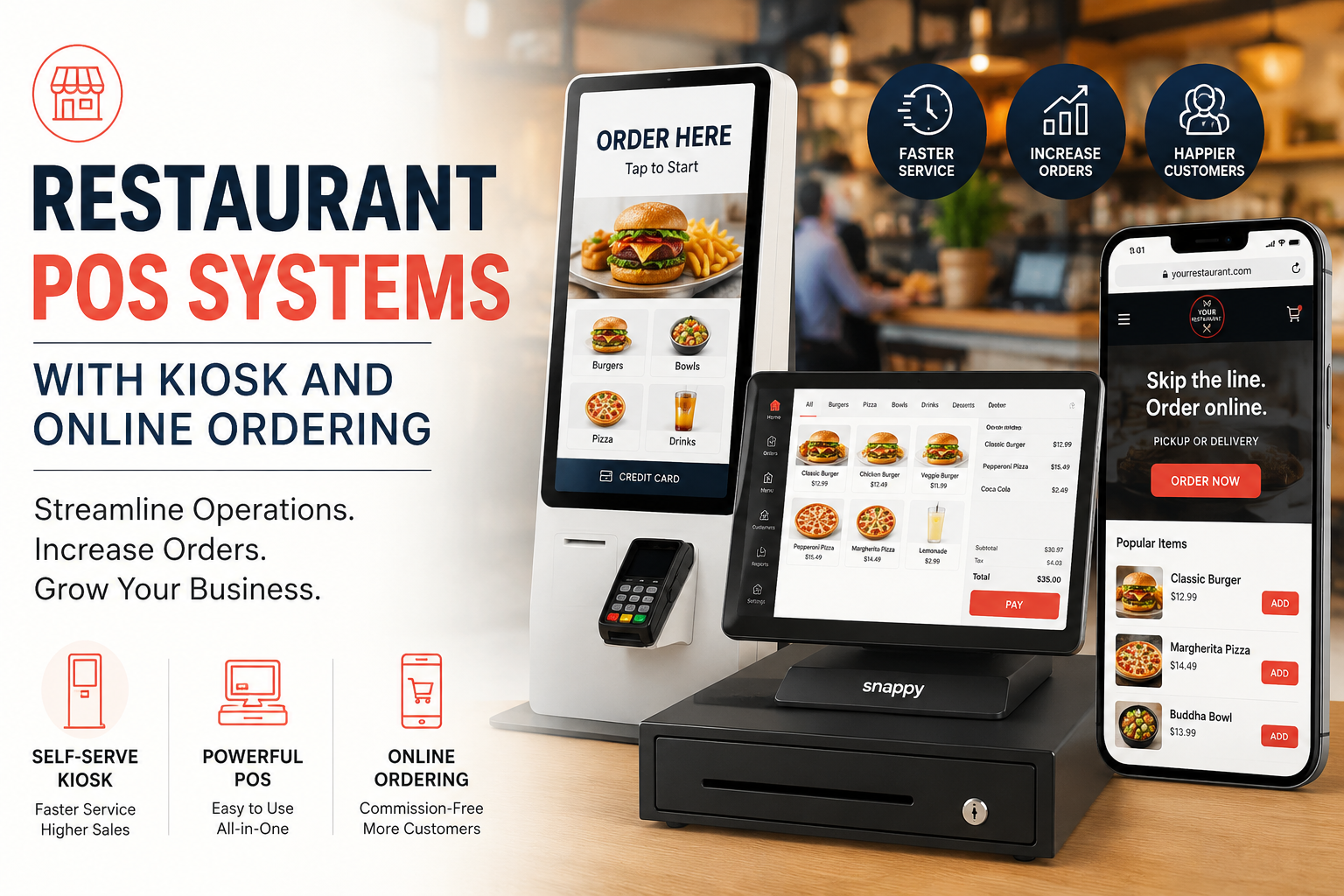
Snappy is built as a single all-in-one platform rather than just a POS with attachments, and it adapts to the way different restaurants actually run with configurations for quick-service, fast-casual, full-service, multi-location groups, cafés, pizzerias, and bubble-tea shops. The point of sale system runs omni-channel ordering off one menu engine, with real-time menu sync across every channel, combo and upsell prompts at checkout, a kitchen display for order flow, and offline mode for uninterrupted service. Setup is measured in hours, and you can bring your own iOS or Android hardware.
The self-serve kiosk transfers orders directly into the POS ledger and the kitchen display, offers loyalty enrollment and automated upsells at checkout, supports multiple languages and 15/21/27-inch formats and auto-syncs orders into the transaction ledger when it’s paired with Snappy’s own POS.
The online ordering and delivery channel charges 0% commission on direct orders, keeps all customer data with the restaurant, integrates Order-with-Google and the major delivery apps, and syncs orders in real time across channels.
Consider a restaurant doing $1,500,000 a year that moves from a fragmented setup to a native platform with built-in kiosk and online ordering. Two effects dominate: kiosks lift the checks they handle, and direct online orders stop paying marketplace commission. Modeled conservatively, the annual impact is substantial against modest platform cost.
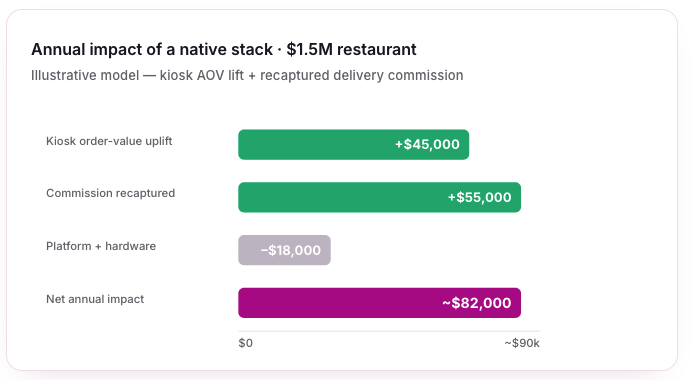
The mix shifts by format: a counter-service or fast-casual concept leans on the kiosk-uplift side, while a full-service restaurant with heavy takeout leans on the recaptured-commission side but both levers point the same way. And note what’s not in this model: the labor hours saved re-keying orders, the errors avoided by one synced menu, the marketing lift from finally owning guest data, and the manager time not spent stitching three vendors’ reports together.
|
Mistake
|
Why it hurts
|
Risk
|
|---|---|---|
|
Evaluating POS on counter or table speed alone
|
Ignores the digital channels that are now a major share of orders.
|
High
|
|
Treating "integration" as a yes/no
|
Everyone says yes; the depth is what differs. Ask how orders actually flow.
|
High
|
|
Relying only on marketplaces for online orders
|
Bleeds 15–30% per order and hands over the customer relationship.
|
High
|
|
Buying a best-of-breed kiosk for a POS it can't sync with
|
Re-keyed orders erase the labor and accuracy gains.
|
Medium
|
|
Ignoring who owns the data
|
Rented customer relationships can't power loyalty or marketing.
|
Medium
|
|
Skipping the peak-service stress test
|
Calm demos hide how the stack behaves under a real rush.
|
Medium
|
For restaurant operators of every kind, the POS is no longer just the register, it’s the system that runs the counter, the tables, the kiosk, and every online order at once. Evaluate it that way.
A kiosk and an online ordering site are easy to buy. A system where they, the counter, the tables, and the kitchen all share one brain is the thing worth evaluating and the thing worth switching for.
It depends on format, but most benefit from at least one. Kiosks pay off wherever guests order at a point rather than a table such as QSR, fast-casual, cafés, food halls, and takeout counters. Online ordering applies to nearly every restaurant that does pickup or delivery, including full-service. Running whichever you use from one POS means the channels reinforce each other instead of fragmenting your operation.
It varies by vendor, location count, and hardware. The more useful figure is net impact: recaptured delivery commission (15–30% per direct order) and higher kiosk tickets (10–30% AOV) typically outweigh platform and hardware cost within the first year for a mid-size restaurant.
Almost every vendor claims integration, but it ranges from real-time shared data to a nightly file export. Native means the kiosk, online ordering, and counter are functions of one system sharing a single menu, order stream, and guest record, so a change or an order appears everywhere at once, with nothing re-keyed by hand.