
June 17th, 2026
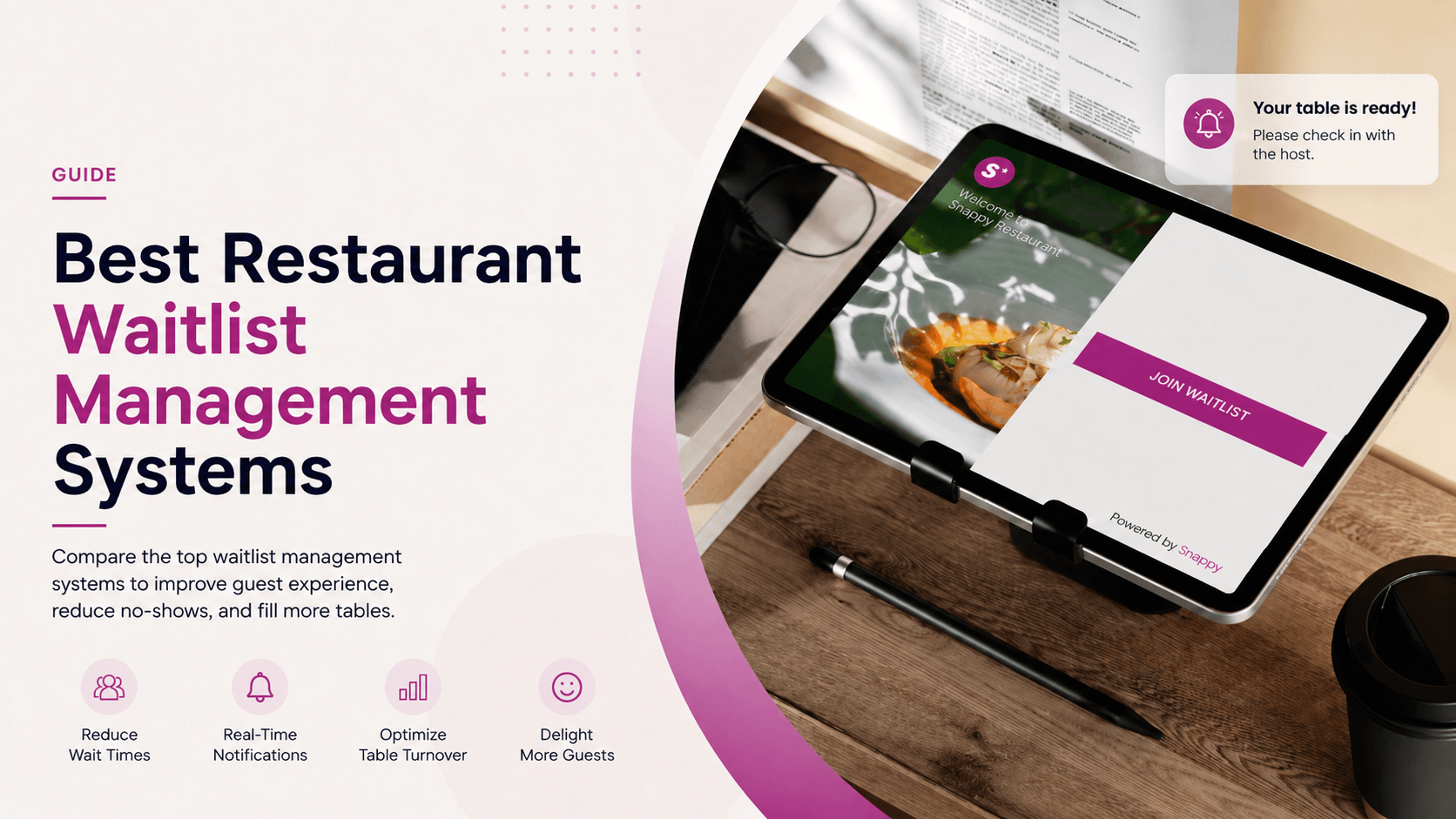
A decade ago, a restaurant waitlist meant a clipboard at the host stand and a stack of buzzing pagers behind it. In 2026, it means software that runs a virtual queue, texts guests when their table is ready, syncs to the POS so checks open on the right table, and feeds reservations into the same floor plan so a Friday night doesn’t collapse under double-bookings.
Most reservation and front-of-house platforms now market a waitlist module. The depth varies enormously. Some have built genuine end-to-end queue management with guest-side check-in, real-time position tracking, and POS write-back. Others have layered an SMS sender on top of a paper-list replacement. Understanding what a waitlist system actually does and where it sits in the front-of-house stack is the first step to choosing one.
Restaurant waitlist software splits into three functional layers:
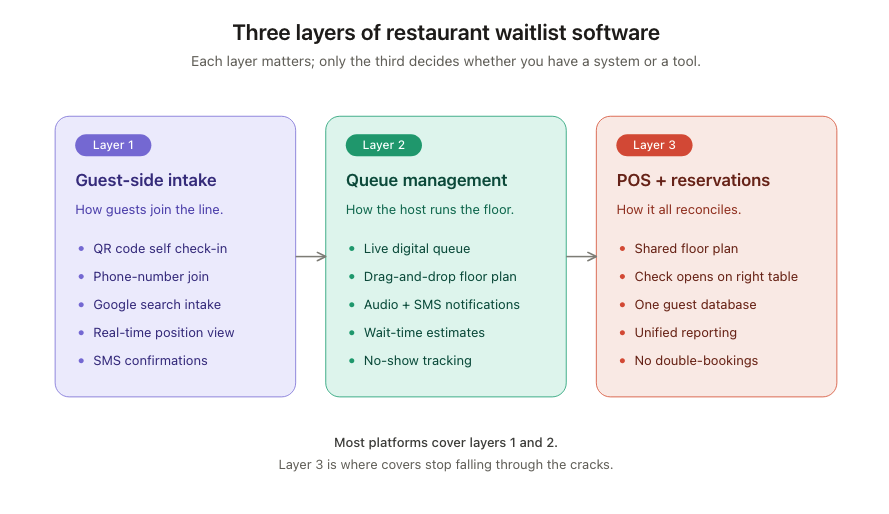
The least visible layer to operators, the most visible to guests. QR-code self check-in, “join the line by phone number,” real-time position and wait-time updates, and the ability to confirm or release the slot. Good intake reduces the lobby crowd and keeps the host stand from becoming a bottleneck during peak hours.
A live digital queue, drag-and-drop floor plan, accurate wait-time estimates pulled from historical turn data, audio and SMS notifications when the table is ready, and clear visibility of which parties are still waiting versus walked away. Solid host-side tooling is where most of the labour savings show up.
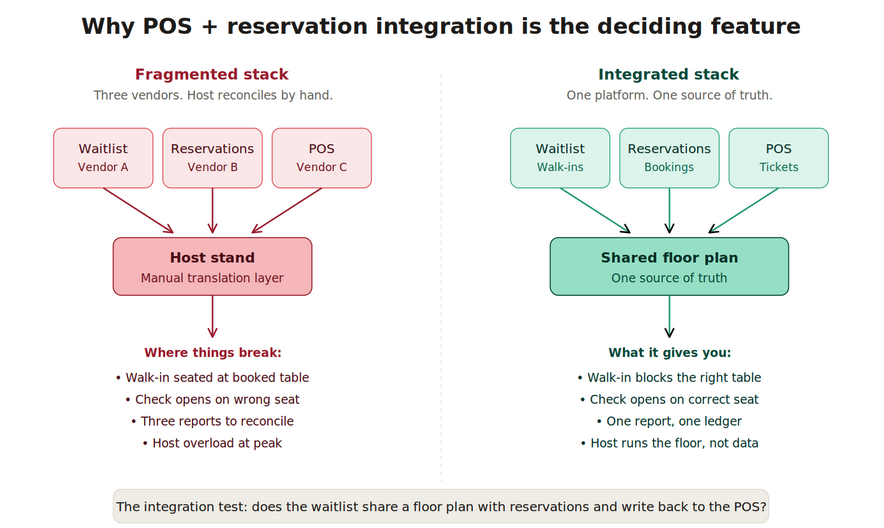
The layer that executes when the waitlist writes back to the POS and shares one floor plan with reservations, walk-ins, deposits, and bookings all reconcile against the same tables and the same revenue ledger. Without it, the host stand becomes the manual translation layer between three systems, which is exactly where covers and revenue go missing on busy nights.
The differences between waitlist platforms aren’t always obvious on a feature list. The structure of how they connect to the rest of your front-of-house determines how much manual work the host still has to do on a busy night.
|
System
|
Features
|
Best For
|
|---|---|---|
|
OpenTable
|
Reservation-first platform with waitlist as a secondary module; strong marketplace visibility and diner network.
|
Full-service restaurants that lean heavily on reservations and want OpenTable's discovery traffic
|
|
Yelp Guest Manager
|
Waitlist tied to Yelp visibility; guests can join from the Yelp listing directly; free or low-cost tier available
|
Restaurants with significant Yelp-driven walk-in traffic
|
|
Waitwhile
|
Standalone virtual waitlist focused on SMS, QR-code intake, and queue analytics; integrates with several POS systems
|
Walk-in-heavy concepts and chains that want a dedicated waitlist tool independent of their POS vendor
|
|
NoWait
|
Mobile-first virtual waitlist with SMS notifications; lighter on reservation features
|
High-volume casual concepts with predictable turn times and minimal reservation needs
|
|
Snappy
|
Vertically integrated waitlist built into the same platform as POS and reservations; shared floor plan, Google Waitlist integration, self-serve QR check-in, audio and SMS notifications
|
Operators who want walk-ins, reservations, and tickets running off one floor plan and one source of truth
|
OpenTable
OpenTable’s strength is its diner network. Restaurants get visibility on the OpenTable marketplace, and the waitlist module slots into the same interface hosts already use for reservations. The trade-off is cost (per-cover fees on top of monthly subscription) and the fact that the waitlist is built as a complement to reservations rather than the primary workflow. For concepts where 80% of covers are reservations and 20% are walk-ins, this is the right shape.
Yelp Guest Manager
Yelp’s positioning is discovery: guests on the Yelp app or website can join the waitlist directly from a restaurant’s listing, which removes a friction step. The free tier is genuinely usable for small operators, and the SMS notifications work as advertised. Reservation features are basic, POS integration is shallow, and reporting is limited compared to dedicated platforms. It’s a strong choice for Yelp-heavy markets and casual concepts; it’s a weaker choice for full-service operations that need their waitlist to talk to the POS.
Waitwhile
Waitwhile is the closest thing to a pure-play virtual waitlist. SMS-based intake, QR-code self check-in, two-way texting, no-show tracking, and a host-side dashboard with floor plan visualisation. It integrates with Toast and Square for POS, which makes it a common choice for operators already on those platforms. The trade-off is that the waitlist still lives in a separate vendor from the POS, so reconciliation and reporting cross system boundaries.
NoWait
NoWait (owned by Yelp) is the lighter-weight option in the Yelp ecosystem: mobile-first, SMS-driven, designed for high-volume casual concepts where the average party turns in 45 minutes and reservations aren’t really part of the workflow. It does what it does well, and the price point is low. It’s not the right answer for full-service or hybrid concepts.
Snappy
Snappy has taken a different route: build the waitlist directly into the same platform as the POS and the reservation system, on the same floor plan, against the same guest database. The result is a single front-of-house workflow rather than three vendors stitched together at the host stand.
Snappy Waitlist systems ships several capabilities that map directly to the operational problems most waitlist tools leave on the host’s plate.
Why this matters: the value of a waitlist isn’t only “fewer people standing in the lobby.” It’s that walk-ins, reservations, deposits, and open tickets all share one floor plan and one source of truth. Snappy’s approach treats the waitlist as part of the same system as the POS and reservations, which removes the manual reconciliation step that breaks down on busy nights.
Integrates with Google Waitlist function
Guests searching for the restaurant on Google can join the waitlist directly from the Google listing, the same way Google Reserve works for bookings. This captures walk-in intent at the moment of search rather than requiring the guest to call, visit, or download an app. For restaurants with strong local search presence, this is a meaningful intake channel that most waitlist tools don’t tap.
Audio and SMS notifications
When a table is ready, the system sends both an SMS to the guest and an audio notification at the host stand. The SMS keeps the guest off-site (the parking lot, the bar next door, a bench outside) without losing them, and the audio cue gives the host a clear hand-off signal without staring at a screen.
Self-serve waitlist with QR code scanning
Guests scan a QR code at the door or on a tabletop, enter their party size and phone number, and join the queue themselves. The host doesn’t have to write anything down, and the guest doesn’t have to wait their turn just to get on the list. During peak rushes this cuts host workload at the moment hosts are most overloaded.
Guests can lineup using their phone number
The phone number is the identifier with no app download, no account creation. This matters because friction at intake is the single biggest predictor of walk-aways before seating. A guest who has to install something to get on the list often just leaves.
Guests can digitally check the wait in real-time and know their position
Once on the list, guests see their position and an estimated wait time on their phone, updated in real time. This is the feature that turns “how much longer?” into a question guests answer themselves instead of asking the host every five minutes. It also reduces the pressure on the host to give optimistic estimates that later turn into complaints.
One floor plan with reservations and POS
This is the integration most other waitlist tools don’t have, and it’s the one that compounds. Because Snappy’s waitlist shares a floor plan with the reservation system and writes back to the POS, a walk-in seated at table 12 immediately blocks that table from being assigned to a 7:30 booking, and the check opens against the correct seat as soon as the server takes the order. Walk-ins, reservations, and tickets reconcile automatically because they’re already in the same system.
Feature lists are easy to write. The honest test is what changes on a Friday night when the lobby is full and a booked party of six walks in. Four areas where waitlist software has documented impact:
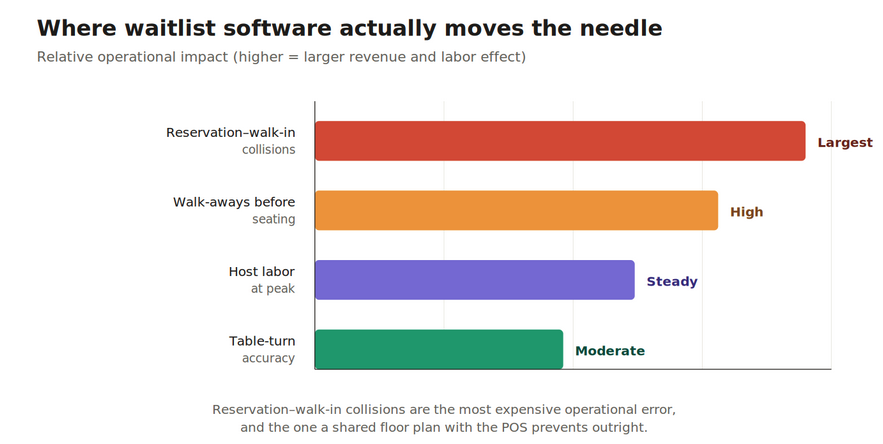
The largest, most consistent payback comes from the combination of self-serve intake and shared-floor-plan integration with reservations. Both target losses that compound on every busy shift and are largely invisible to operators relying on paper lists and host memory.
Most providers will check the obvious feature boxes such as SMS, QR codes, a dashboard. The narrower questions that actually distinguish them:
“Waitlist + reservation” in a feature list often means two separate modules that share a login. Ask the vendor to demo three workflows on the same floor plan view: a walk-in joining via QR code, a reservation arriving 15 minutes early, and a server opening a check on a seated walk-in. If any of those requires the host to re-enter data or switch screens, the integration is cosmetic.
The gap between waitlist tools that “manage a list” and waitlist systems that actually integrate with the rest of the front of house is wider than most marketing pages suggest. The useful waitlist in 2026 isn’t the one with the most channels listed, it’s the one wired most deeply into the workflows where covers actually get lost: walk-aways before seating, reservation-walk-in collisions, missed table-turn opportunities, and tickets that open against the wrong seat.
Margins are thin and front-of-house labour is structurally tight. Every cover recovered from a walk-away and every reservation collision avoided flows directly to the bottom line. The question isn’t whether your restaurant will have a digital waitlist. It’s whether that waitlist will be a separate tool the host reconciles by hand, or part of the same system as your reservations and your POS.
Only if your reservation system’s waitlist module is shallow. The risk of running them separately is reservation-walk-in collision, a walk-in seated at a table booked for 30 minutes later. If your reservation system shares a floor plan with its waitlist (Snappy, OpenTable to a lesser extent), one system is enough. If it doesn’t, you’ll need either a unified front-of-house platform or very disciplined host-stand procedures.
Standalone waitlist tools run roughly $20–$150 per month per location depending on feature tier. Reservation-plus-waitlist platforms range from free tiers (Yelp Guest Manager) to per-cover models (OpenTable) that scale with volume. Vertically integrated platforms where the waitlist is part of the POS subscription often include it without a separate fee. Always price the full bundle (POS + reservations + waitlist + SMS) rather than the headline subscription.
Some do, most don’t. The integration to look for is Google Waitlist (the equivalent of Google Reserve for walk-ins) which lets guests join the queue directly from a Google search result or Maps listing. This captures walk-in intent at the moment of search rather than requiring the guest to physically arrive at the door first. Snappy supports this integration natively; many standalone waitlist tools don’t.